Switching from FreshBooks?
Time tracking and invoicing for $48 a year
If you mostly use FreshBooks to track time and send invoices, Invar does that for $48 CAD a year, with no limit on clients. And it brings your FreshBooks history with it.
30-day free trial · macOS 12 or later · prices in CAD
What a year costs
Invar against FreshBooks' entry plan, in Canadian dollars before tax.
- Invar $48 / year Unlimited clients, every feature
- FreshBooks Lite $280 / year Billed yearly · Up to 5 clients
FreshBooks pricing as of October 2026.
Side by side
| Feature | Invar | FreshBooks Lite |
|---|---|---|
| Annual pricing | $48 | $280 |
| Max clients | Unlimited | 5 |
| Time tracking | Yes, with week and month views | Yes |
| Where your data lives | One file on your Mac, with automatic backups to your own cloud drive | In the cloud |
| If you stop paying | Use the version you have, forever | Access ends with billing cycle unless reactivated |
| Runs on | Mac (macOS 12 or later) | Web browser, iPhone and Android |
When to choose Invar
Invar provides exactly what your solo small business needs for time tracking, invoicing, and accurate tax calculations. All for 83% less than a FreshBooks Lite plan, and for an unlimited number of clients.
When to choose FreshBooks
FreshBooks adds bookkeeping, expense tracking, bank connections, credit card payments and invoice emailing. As your business grows, these may be worth the extra price. In the meantime, Invar is a lower-overhead alternative.
Moving from FreshBooks
Invar reads the CSV files FreshBooks exports. It never asks for your FreshBooks password, and it shows you everything before it saves anything.
- Export from FreshBooks. Everything Invar and your business need can be exported to four CSV files from four FreshBooks views and reports: Clients, Time Entry Details, Invoice Details and Payments Collected.
- Choose the files in Invar. In Invar, open Settings, then Import from FreshBooks, choose the four exported files, and run the import. Invar automatically works out how to import all your data, so you can be up and running within 5 minutes.
- Review your data. Before finalizing your import, Invar lets you review your data so that you can confirm clients, currencies and project billing.
- Import. Invar backs up any existing data, then imports all of your FreshBooks data at once. If you import the same data again, Invar will never add the same records twice.
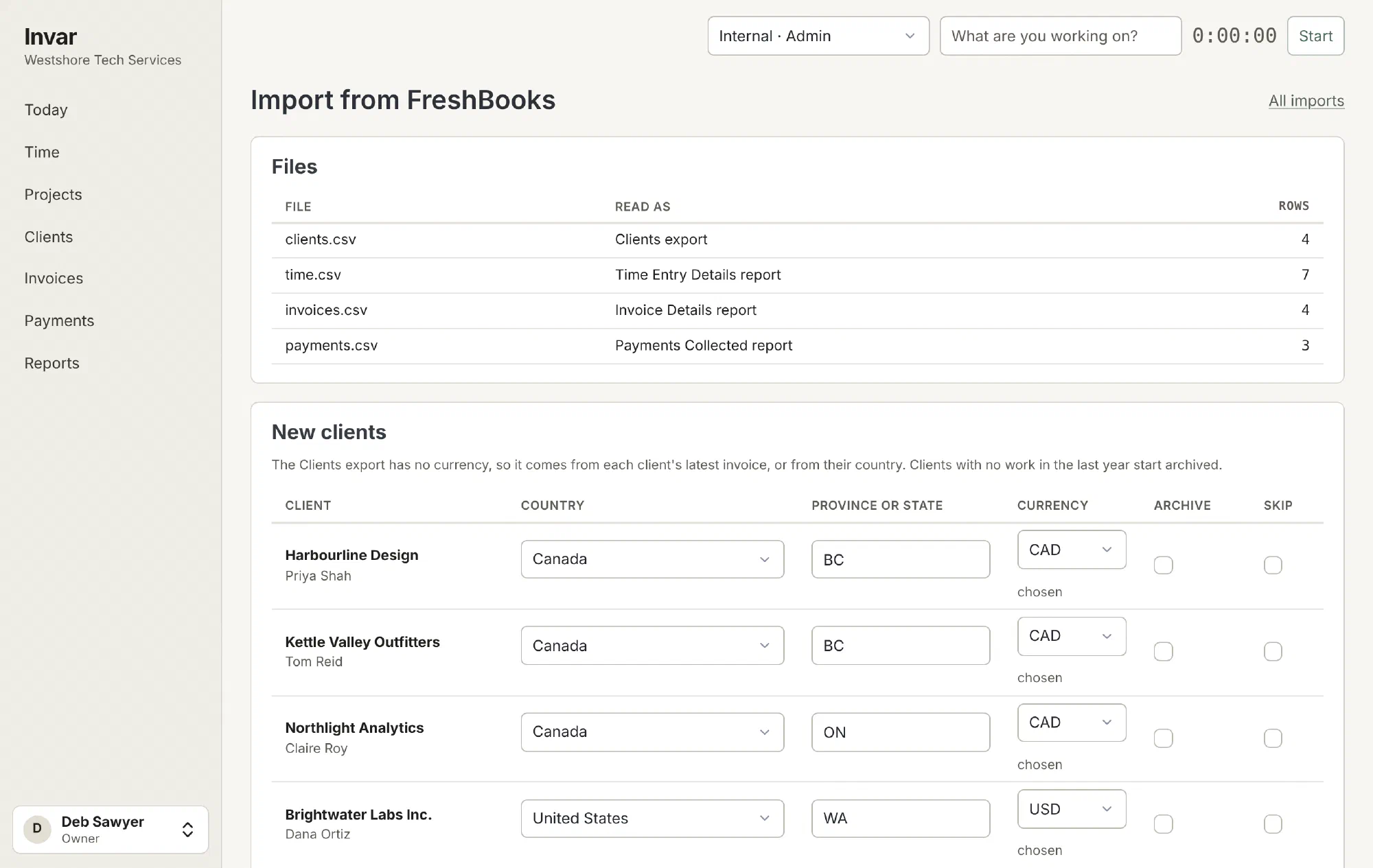
- Invoice numbers continue from your last FreshBooks invoice.
- Time already billed in FreshBooks stays billed.
- Invoices keep their taxes exactly as FreshBooks printed them.
- USD and EUR invoices get the Bank of Canada rate for their date, so your reports cover the years before Invar.
Expenses, estimates, items and team members don't come across.
Questions about switching
Do I have to cancel FreshBooks first?
No. Import your history, then run both during the 30-day trial until you're happy. Keep your exported files as your own copy.
What happens to my FreshBooks data when I cancel?
FreshBooks says your account stays open until the end of the billing cycle, your data is kept, and you can reactivate to see it. It also says accounts inactive for 30 days or more may be deleted, so export first.
Will my invoice numbers carry on?
Yes. Imported invoices keep their FreshBooks numbers, and Invar's next invoice follows the highest one. You can change it on the import page.
Can I import invoices in USD or EUR?
Yes. Each keeps its currency and gets the Bank of Canada rate for its date, shown on the import page before anything is saved.
Try Invar free for 30 days
No account and no card needed. Download it and import your FreshBooks history.
Download for MacFreshBooks is a trademark of its owner. Invar and Waterbay Technology Ltd. are not affiliated with FreshBooks.